> ## Documentation Index
> Fetch the complete documentation index at: https://docs.t3gemstone.org/llms.txt
> Use this file to discover all available pages before exploring further.
# Introduction
> DeepX DX-M1 NPU Accelerator Module
DeepX is a semiconductor company that develops NPU (Neural Processing Unit) accelerators in order to perform
artificial intelligence inference operations with low power consumption.
Since the M.2 2280 slot on the T3 Gemstone O1 development board provides a PCIe interface, the artificial
intelligence processing power of the board can be increased significantly with the **DeepX DX-M1**
accelerator module installed into this slot.
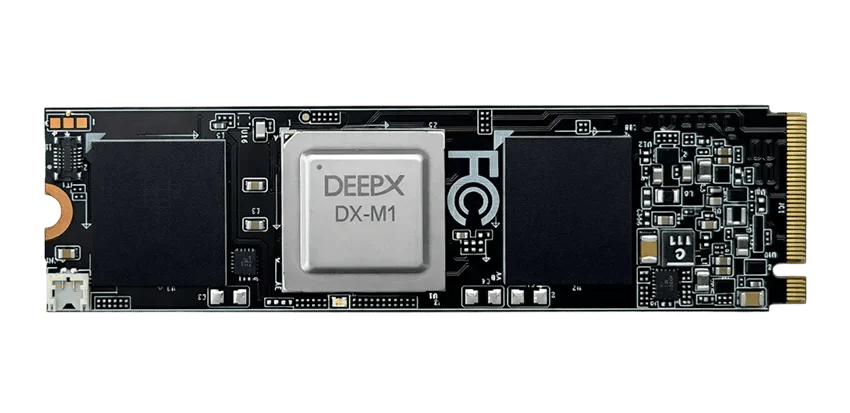 The C7x DSP and MMA units located in the processor of the development board provide 4 TOPS of processing
power. The DX-M1 module on its own provides 25 TOPS of processing power, making it possible to run larger
models at higher resolutions and with higher frame rates.
The DX-M1 module uses the M.2 2280 slot on the board. Since this slot is also used for an NVMe SSD, the
accelerator module and the SSD cannot be installed at the same time.
## Technical Specifications
| Feature | Value |
| ----------------- | ----------------------------------- |
| Accelerator | DEEPX DX-M1 |
| Processing Power | 25 TOPS (INT8) |
| Onboard Memory | 4GB LPDDR5 |
| Interface | PCIe Gen3, M.2 M-key |
| Form Factor | M.2 2280 |
| Power Consumption | 2W - 5W |
| Model Format | `.dxnn` (compiled from ONNX models) |
| Programming API | C/C++ and Python |
You can access up-to-date and detailed hardware information about the module on the
[DEEPX DX-M1 product page](https://deepx.ai/products/dx-m1/).
## DXNN Software Development Kit
The DX-M1 module is used together with the **DXNN SDK** provided by DEEPX. The SDK consists of components
that cover the process from preparing the model to running it on the board.
The model compiler that compiles models in ONNX format, accompanied by a configuration file, into the
`.dxnn` format that can run on the NPU. It is run on the development computer.
The runtime layer that communicates with the NPU hardware. It performs model loading, input/output
management and inference operations. It provides C/C++ and Python interfaces.
The kernel driver that allows the accelerator module to be recognized by the operating system over
PCIe.
The set of dedicated plugins used to build GStreamer-based image processing pipelines. It is used for
processing real-time video streams.
The template project that contains ready-to-use example applications for tasks such as object detection,
classification and segmentation.
The model repository that contains pre-compiled `.dxnn` models. It makes quick experiments possible
without needing the compilation step.
## Use Cases
* Object detection (YOLO family models)
* Object tracking and multi-channel video analytics
* Image classification
* Semantic segmentation
* Pose estimation
* Optical character recognition (OCR)
* Face recognition
## Document Contents
Hardware assembly, driver and runtime installation
Monitoring the device status and running inference with Python
DX-APP examples and video processing with DX-STREAM
Frequently encountered errors and their solutions
The C7x DSP and MMA units located in the processor of the development board provide 4 TOPS of processing
power. The DX-M1 module on its own provides 25 TOPS of processing power, making it possible to run larger
models at higher resolutions and with higher frame rates.
The DX-M1 module uses the M.2 2280 slot on the board. Since this slot is also used for an NVMe SSD, the
accelerator module and the SSD cannot be installed at the same time.
## Technical Specifications
| Feature | Value |
| ----------------- | ----------------------------------- |
| Accelerator | DEEPX DX-M1 |
| Processing Power | 25 TOPS (INT8) |
| Onboard Memory | 4GB LPDDR5 |
| Interface | PCIe Gen3, M.2 M-key |
| Form Factor | M.2 2280 |
| Power Consumption | 2W - 5W |
| Model Format | `.dxnn` (compiled from ONNX models) |
| Programming API | C/C++ and Python |
You can access up-to-date and detailed hardware information about the module on the
[DEEPX DX-M1 product page](https://deepx.ai/products/dx-m1/).
## DXNN Software Development Kit
The DX-M1 module is used together with the **DXNN SDK** provided by DEEPX. The SDK consists of components
that cover the process from preparing the model to running it on the board.
The model compiler that compiles models in ONNX format, accompanied by a configuration file, into the
`.dxnn` format that can run on the NPU. It is run on the development computer.
The runtime layer that communicates with the NPU hardware. It performs model loading, input/output
management and inference operations. It provides C/C++ and Python interfaces.
The kernel driver that allows the accelerator module to be recognized by the operating system over
PCIe.
The set of dedicated plugins used to build GStreamer-based image processing pipelines. It is used for
processing real-time video streams.
The template project that contains ready-to-use example applications for tasks such as object detection,
classification and segmentation.
The model repository that contains pre-compiled `.dxnn` models. It makes quick experiments possible
without needing the compilation step.
## Use Cases
* Object detection (YOLO family models)
* Object tracking and multi-channel video analytics
* Image classification
* Semantic segmentation
* Pose estimation
* Optical character recognition (OCR)
* Face recognition
## Document Contents
Hardware assembly, driver and runtime installation
Monitoring the device status and running inference with Python
DX-APP examples and video processing with DX-STREAM
Frequently encountered errors and their solutions