> ## Documentation Index
> Fetch the complete documentation index at: https://docs.t3gemstone.org/llms.txt
> Use this file to discover all available pages before exploring further.

# Board Specifications

> T3 Gemstone O1

export const SnippetCardEntry = ({children, header, link = ""}) => {
  const headerWords = header.split(" ");
  const headerLast = headerWords.pop();
  const headerStart = headerWords.join(" ");
  return <div>
      <div className="flex items-start gap-2 mb-1 mt-1">
        <Icon icon="arrow-right" />
        {link ? <a href={link} className="leading-tight">
            {headerStart && <b>{headerStart} </b>}
            <span className="inline-flex items-center gap-1">
              <b>{headerLast} </b>
              <Icon size={12} icon="arrow-up-right-from-square" />
            </span>
          </a> : <b className="leading-tight dark:text-gray-50">{header}</b>}
      </div>
      <p className="">{children}</p>
    </div>;
};

<div className="text-2xl font-light mt-4 mb-8">
  High-performance development board based on Texas Instruments AM67A processor
</div>

<Columns cols={1}>
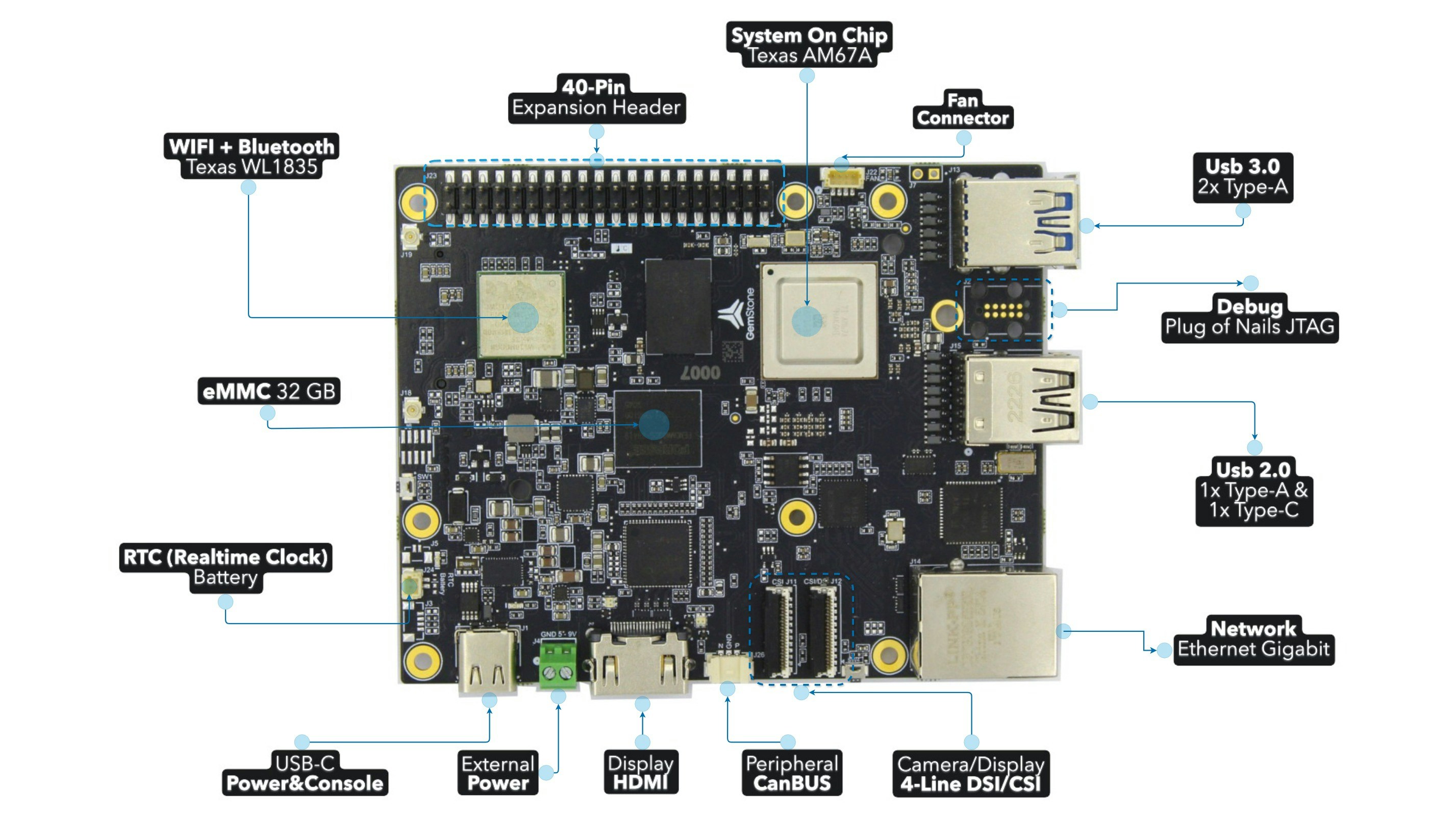
  <Frame caption="Front">
    <img className="rounded-lg" src="https://mintcdn.com/t3gemstone-754bcb96/PriyfvlgqC_ctt5l/images/o1-board/29-front.jpg?fit=max&auto=format&n=PriyfvlgqC_ctt5l&q=85&s=967c08a196592dd87f7648e5bfb7ec81" width="2854" height="1606" data-path="images/o1-board/29-front.jpg" />
  </Frame>

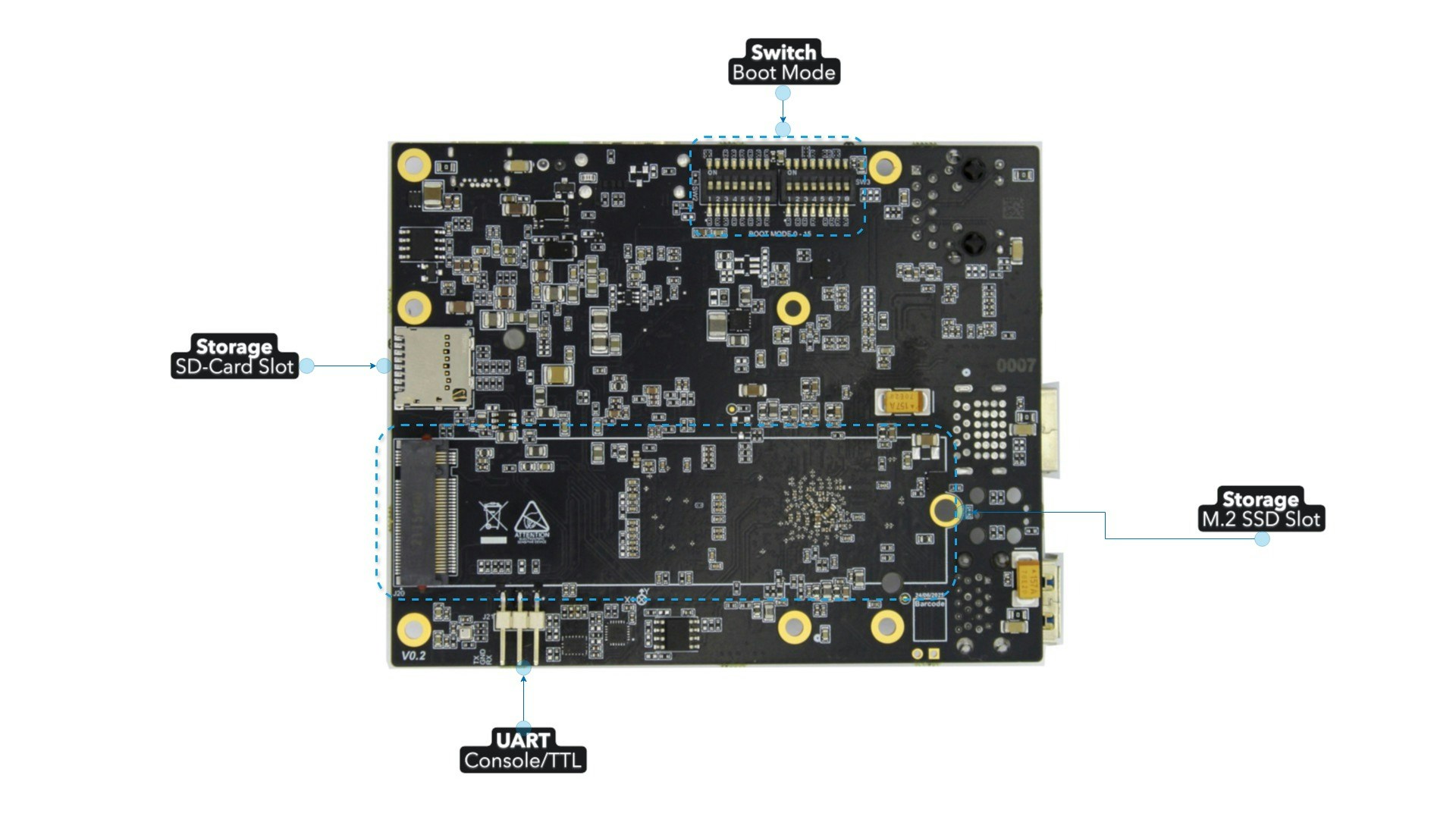
  <Frame caption="Back">
    <img className="rounded-lg" src="https://mintcdn.com/t3gemstone-754bcb96/4OX2ChXu75WAywWt/images/o1-board/30-back.jpg?fit=max&auto=format&n=4OX2ChXu75WAywWt&q=85&s=e3d13c93f1f74342f3e01db75dc09f13" width="1920" height="1080" data-path="images/o1-board/30-back.jpg" />
  </Frame>
</Columns>

<CardGroup cols={3}>
  <Card title="CPU" icon="microchip">
    Quad-core 64-bit ARM Cortex-A53 @1.4 GHz for running high-level operating systems such as Linux
  </Card>

  <Card title="MCU" icon="microchip" iconType="light">
    Dual single-core ARM Cortex-R5F @800 MHz for running real-time MCU applications
  </Card>

  <Card title="AI Accelerator" icon="microchip-ai">
    Dual 2 TOPS (4 TOPS total) deep learning accelerators for running AI applications
  </Card>

  <Card title="GPU" icon="display">
    50 GFLOPS computing power, fully compliant with OpenGL ES 3.2, OpenCL 1.2 EP and Vulkan 1.2 APIs
  </Card>

  <Card title="4GB RAM" icon="memory">
    LPDDR4 system memory
  </Card>

  <Card title="32GB eMMC" icon="hard-drive">
    Onboard flash storage that allows the board to operate without a microSD card
  </Card>
</CardGroup>

# Core Processing Platform

<CardGroup cols={2}>
  <Card title="Processor" icon="microchip">
    <SnippetCardEntry header="TI AM67A" link="https://www.ti.com/product/AM67A">
      Quad-core 64-bit ARM Cortex-A53 @1.4 GHz, multi-core ARM/GPU processors, DSP, AI accelerators
    </SnippetCardEntry>
  </Card>

  <Card title="Graphics" icon="display">
    <SnippetCardEntry header="IMG BXS-4-64" link="https://www.imaginationtech.com/product/img-bxs-4-64-mc1">
      Advanced GPU for high-performance graphics processing
    </SnippetCardEntry>
  </Card>

  <Card title="System Memory" icon="memory">
    <SnippetCardEntry header="4GB LPDDR4" link="https://www.longsys.com/products/embedded-storage/embedded-storage/lpddr.html">
      x32 bit width high-speed system memory
    </SnippetCardEntry>
  </Card>
</CardGroup>

# Storage

<CardGroup cols={2}>
  <Card title="Onboard Storage" icon="hard-drive">
    <SnippetCardEntry header="32GB eMMC" link="https://www.longsys.com/products/embedded-storage/embedded-storage/automotive-industriai-wide-temperature-industriai-emmc.html">
      High-speed onboard flash storage
    </SnippetCardEntry>

    <SnippetCardEntry header="512Kbit EEPROM" link="https://www.microchip.com/en-us/product/AT24C512C">
      I2C-compatible serial EEPROM for configuration storage
    </SnippetCardEntry>
  </Card>

  <Card title="Expandable Storage" icon="sd-card">
    <SnippetCardEntry header="microSD Card Slot">
      Supports high-speed SDR104 mode
    </SnippetCardEntry>

    <SnippetCardEntry header="M.2 2280 SSD Port">
      Supports high-capacity NVMe SSD
    </SnippetCardEntry>
  </Card>
</CardGroup>

# Network Connections

<CardGroup cols={2}>
  <Card title="Wireless" icon="wifi">
    <SnippetCardEntry header="TI WL1835MOD" link="https://www.ti.com/product/WL1835MOD">
      Wi-Fi 4 (802.11n), external dual 2.4 GHz antennas<br />
      Bluetooth 5.1, Bluetooth Low Energy (BLE)
    </SnippetCardEntry>
  </Card>

  <Card title="Wired" icon="network-wired">
    <SnippetCardEntry header="Gigabit Ethernet">
      RJ45 Gigabit Ethernet port for high-speed wired connectivity
    </SnippetCardEntry>

    <SnippetCardEntry header="CAN Bus" link="https://www.ti.com/product/TCAN1462-Q1">
      CAN FD transceiver for automotive applications
    </SnippetCardEntry>
  </Card>
</CardGroup>

# I/O Interfaces

<CardGroup cols={2}>
  <Card title="USB Ports" icon="usb">
    <SnippetCardEntry header="2 x USB 3.0 Type-A" link="">
      Supports 5Gbps high-speed operation
    </SnippetCardEntry>

    <SnippetCardEntry header="1 x USB 2.0 Type-A" link="" />

    <SnippetCardEntry header="1 x USB 2.0 Type-C" link="" />

    <SnippetCardEntry header="1 x USB 2.0 Type-C (Device + PD)" link="">
      Supports USB device mode and Power Delivery (PD)
    </SnippetCardEntry>
  </Card>

  <Card title="Display & Camera Interfaces" icon="camera">
    <SnippetCardEntry header="2 x 4-lane MIPI CSI" link="">
      Supports wide range of camera modules such as Raspberry Pi Camera V2
    </SnippetCardEntry>

    <SnippetCardEntry header="1 x 4-lane MIPI DSI" link="">
      Supports wide range of touch displays such as Raspberry Pi 7" or Waveshare 7" and 10.1" displays
    </SnippetCardEntry>

    <SnippetCardEntry header="1 x HDMI" link="">
      Full-size HDMI output for external displays
    </SnippetCardEntry>

    ***

    <span className="text-xs"><sup>1</sup> One of the two CSI ports is muxed with DSI capability, you can select between dual CSIs or one CSI & one DSI configurations.</span>
  </Card>

  <Card title="Expansion Interfaces" icon="code">
    <SnippetCardEntry header="40-pin GPIO Header" link="">
      Default pinout is compatible with Raspberry Pi
    </SnippetCardEntry>

    <SnippetCardEntry header="JTAG Connector" link="">
      ARM Cortex 10-pin JTAG connector for debugging Cortex-R5 MCU cores
    </SnippetCardEntry>

    <SnippetCardEntry header="UART Connector" link="">
      3-pin 2.54mm connector provides access to serial console for debugging and system management
    </SnippetCardEntry>
  </Card>
</CardGroup>

# Onboard Sensors

<CardGroup cols={2}>
  <Card title="Motion Sensing" icon="compass">
    <SnippetCardEntry header="InvenSense ICM-20948" link="https://invensense.tdk.com/products/motion-tracking/9-axis/icm-20948/">
      9-Axis MEMS MotionTracking sensor with accelerometer, gyroscope, and magnetometer
    </SnippetCardEntry>
  </Card>

  <Card title="Environmental Monitoring" icon="temperature-half">
    <SnippetCardEntry header="Bosch BMP390" link="https://www.bosch-sensortec.com/products/environmental-sensors/pressure-sensors/pressure-sensors-bmp390.html">
      24-bit barometric pressure sensor
    </SnippetCardEntry>

    <SnippetCardEntry header="TI HDC2010" link="https://www.ti.com/product/HDC2010">
      Humidity and temperature sensor
    </SnippetCardEntry>
  </Card>
</CardGroup>

# Power & System Control

<CardGroup cols={2}>
  <Card title="Power Input" icon="plug">
    <SnippetCardEntry header="USB Type-C Power (5-9V / 3A)" link="">
      Primary power input with USB Power Delivery support
    </SnippetCardEntry>

    <SnippetCardEntry header="DC Power Connector (5-12V / 5A)" link="">
      Alternative power input
    </SnippetCardEntry>
  </Card>

  <Card title="System Management" icon="toggle-on">
    <SnippetCardEntry header="Boot Mode Switch" link="">
      Hardware switch for selecting different boot modes and configurations
    </SnippetCardEntry>

    <SnippetCardEntry header="Power Button" link="">
      Dedicated button for board reset functionality
    </SnippetCardEntry>

    <SnippetCardEntry header="Programmable Button" link="">
      User-configurable button
    </SnippetCardEntry>

    <SnippetCardEntry header="Red-Green LEDs" link="">
      Programmable status indicators for system monitoring and user feedback
    </SnippetCardEntry>
  </Card>

  <Card title="Thermal" icon="fan">
    <SnippetCardEntry header="Fan Connector" link="">
      4-pin JST SH connector for active cooling solutions with PWM fan control
    </SnippetCardEntry>
  </Card>

  <Card title="Real-Time Clock" icon="clock">
    <SnippetCardEntry header="Maxim DS1340" link="https://www.analog.com/en/products/ds1340.html">
      I2C RTC module with external battery connector (2-pin JST SH)
    </SnippetCardEntry>
  </Card>
</CardGroup>