> ## Documentation Index
> Fetch the complete documentation index at: https://docs.t3gemstone.org/llms.txt
> Use this file to discover all available pages before exploring further.
# Development
> Ecosystem and Development
This section contains information about the scope of the T3 Gemstone Project, what kind of work can be done, methods
for software development, and an introduction to the ecosystem.
By the end of this section, you will have knowledge about the following topics:
* The components of the Gemstone development board's Hardware and Software studies.
* Methods for compiling software on the board or on a Ubuntu computer.
* What the projects in the Github repositories are.
# 1. Ecosystem
The Gemstone project is entirely composed of open-source software and hardware components. This means you can
redesign your own systems using the electronic designs of the development board and freely use the software
components and codes by making changes, as outlined in the [End User License](./license) section regarding what
considerations should be taken into account.
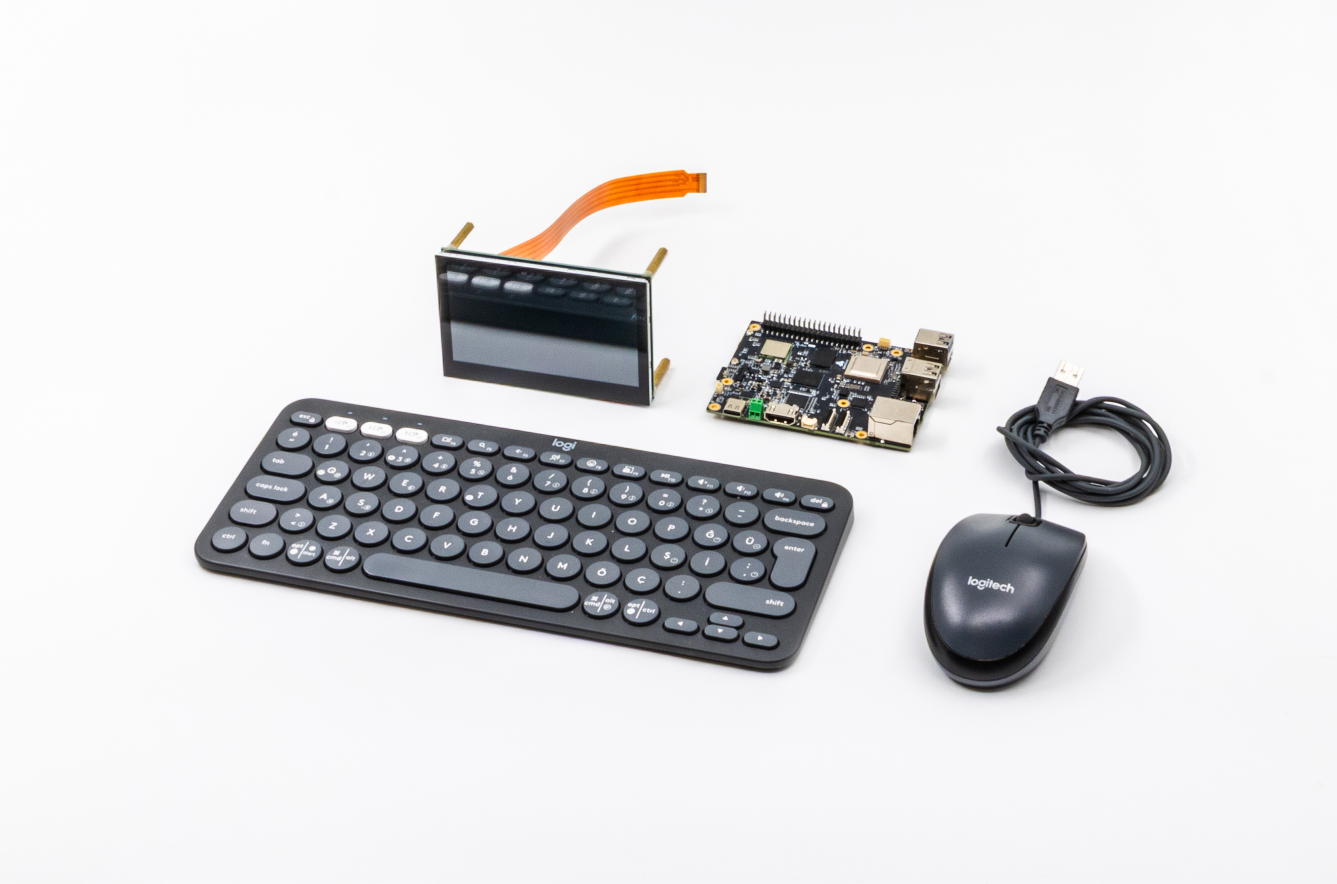 To exemplify the projects in which the development boards can be used, a list is provided below, and your
contributions on what else can be added are welcome!
1. Autopilot and auxiliary mission computer for unmanned aerial, ground, and underwater vehicles.
2. Agricultural vehicles, smart home projects, IoT, Robotics, Industrial arms.
3. Camera systems using image processing and artificial intelligence together.
4. Embedded computer for autonomous robotics projects.
5. Touch panels and kiosk screens in command and control systems.
Dozens of different examples of the studies listed and new technology news are regularly published on the
[Community Forums](https://community.t3gemstone.org/c/blog/71).
### 1.1. Development Board / Embedded Computer
Gemstone products are mostly used in embedded technology studies and are equipped with various sensors and
peripheral devices. It is possible to create projects such as processing data from sensors and cameras via
communication methods like serial port, CanBUS, I2C, SPI, Ethernet, and controlling various motors
and actuators.
The hardware designs (PCB, etc.) of the *T3-GEM-O1* development board are available
[at this address](https://github.com/t3gemstone/hardware). Examples of how to use the hardware on it are explained
in the later ([Development Boards](./boards/o1/introduction)) sections.
To exemplify the projects in which the development boards can be used, a list is provided below, and your
contributions on what else can be added are welcome!
1. Autopilot and auxiliary mission computer for unmanned aerial, ground, and underwater vehicles.
2. Agricultural vehicles, smart home projects, IoT, Robotics, Industrial arms.
3. Camera systems using image processing and artificial intelligence together.
4. Embedded computer for autonomous robotics projects.
5. Touch panels and kiosk screens in command and control systems.
Dozens of different examples of the studies listed and new technology news are regularly published on the
[Community Forums](https://community.t3gemstone.org/c/blog/71).
### 1.1. Development Board / Embedded Computer
Gemstone products are mostly used in embedded technology studies and are equipped with various sensors and
peripheral devices. It is possible to create projects such as processing data from sensors and cameras via
communication methods like serial port, CanBUS, I2C, SPI, Ethernet, and controlling various motors
and actuators.
The hardware designs (PCB, etc.) of the *T3-GEM-O1* development board are available
[at this address](https://github.com/t3gemstone/hardware). Examples of how to use the hardware on it are explained
in the later ([Development Boards](./boards/o1/introduction)) sections.
 ### 1.2. Operating System
Gemstone runs on a GNU/Linux operating system. It includes components such as the
[Kernel](https://github.com/t3gemstone/linux), [Bootloader (U-Boot)](https://github.com/t3gemstone/u-boot),
[Distribution (Distro)](https://github.com/t3gemstone/sdk/tree/main/distro), and Firmware. Tools like
[Yocto Project](https://kureansiklopedi.com/en/detay/yocto-project-the-yocto-project-eeba0) and
[Debootstrap](https://github.com/t3gemstone/debos) were used to assemble the system.
As GNU/Linux distributions ([Distro](https://github.com/t3gemstone/sdk/tree/main/distro)), Debian, Ubuntu,
and Poky are used. The use of Debian or Ubuntu is offered as selectable, as it may vary depending on the board's needs.
Various package management systems are used to perform software updates in GNU/Linux operating systems. For
example, in the [Quick Start](./quickstart#2-4-update-the-gemstone-operating-system) section, an Ubuntu
update example was given for system updates.
Similarly, the [https://packages.t3gemstone.org/apt](https://packages.t3gemstone.org/apt) package management system is used for all customized kernel,
driver, etc., software for T3 Gemstone boards. When you run the update command, the latest packages
— *if available* — are downloaded from the servers.
The operating system distribution used for Gemstone can also be used for BeagleBoard's BeagleY-AI. If you select
BeagleY-AI as the Board in the GemImager application, the created SD card can be used on the BeagleY-AI board.
Gemstone's operating system distribution is more powerful and up-to-date than what Beagleboard offers.
For faster boot times, various customizations in the Linux kernel and [Device Tree](/en/faq#what-is-device-tree) changes for driver selections of the
hardware included in the development boards are available in the
[github repository](https://github.com/t3gemstone/linux/tree/v6.1.83-ti-rt-arm64-r67-t3-gem-o1).
### 1.3. SDK (Software Development Kit)
The [T3 Gemstone SDK](https://github.com/t3gemstone/sdk) is used to compile and assemble all the components
mentioned above — *kernel, bootloader, distribution, etc.* — tools, packages, and software, and to create image files.
While the README file of the relevant repository briefly explains how to use it, more detailed explanations are
provided in the [SDK](./sdk/introduction) section of this Documentation. Tools such as
[Devbox](https://www.jetify.com/devbox), [Distrobox](https://github.com/89luca89/distrobox),
[Debos](https://github.com/t3gemstone/debos), and [Taskfile](https://taskfile.dev/) used in the SDK work are
areas that require extensive knowledge, so helpful resources are provided at the end of the documentation based
on your interests.
### 1.4. Github Repository
The purposes of the projects in the T3 Gemstone Github repository are listed in the table below.
| Project | Repo | Description |
| :------------- | :------------------------------------------------------------------------ | :----------------------------------------------------------------------------------------------------------------------------------------------------------------------------------------------- |
| SDK | [t3gemstone/sdk](https://github.com/t3gemstone/sdk) | Software development kit that compiles components like Kernel, U-Boot, Firmware, Driver, Initrd to create an operating system image. |
| Documentation | [t3gemstone/docs](https://github.com/t3gemstone/docs) | Mintlify source codes of this documentation you are reading. |
| Yocto | [t3gemstone/meta-gemstone](https://github.com/t3gemstone/meta-gemstone) | Codes of the Yocto project. |
| Linux Kernel | [t3gemstone/linux](https://github.com/t3gemstone/linux) | Linux codes used on the development boards. |
| Bootloader | [t3gemstone/u-boot](https://github.com/t3gemstone/u-boot) | Bootloader codes used on the development boards. Bootloader performs hardware health checks and starts the Linux kernel. |
| Debos | [t3gemstone/debos](https://github.com/t3gemstone/debos) | A cloned version of the Debos project with additional features for creating distributions. |
| GemImager | [t3gemstone/gem-imager](https://github.com/t3gemstone/gem-imager) | A customized version of the rpi-imager project with additional features for writing images to Gemstone boards. |
| Hardware | [t3gemstone/hardware](https://github.com/t3gemstone/hardware) | PCB designs of hardware components like motherboards for Gemstone boards. |
| Toolchains | [t3gemstone/toolchains](https://github.com/t3gemstone/toolchains) | Tools used for compiling C/C++ projects for different architectures. |
| Package Server | [t3gemstone/package-server](https://github.com/t3gemstone/package-server) | Linux APT package management server/system located at packages.t3gemstone.org. |
| noVNC | [t3gemstone/t3-gem-vnc](https://github.com/t3gemstone/t3-gem-vnc) | Software that allows remote desktop connection to Gemstone via a browser. |
| Ardupilot | [t3gemstone/ardupilot](https://github.com/t3gemstone/ardupilot) | autopilot software adapted for Gemstone, which can be used for every vehicle imaginable, from manned/unmanned air, land, and sea vehicles, to helicopters and aircraft, and even marine vessels. |
| NuttX | [t3gemstone/nuttx](https://github.com/t3gemstone/nuttx) | Real-time operating system running on hardware with MCUs like PX4. It will be made to work on the R5 MCU cores in Gemstone O1 boards in the future. |
# 2. Development
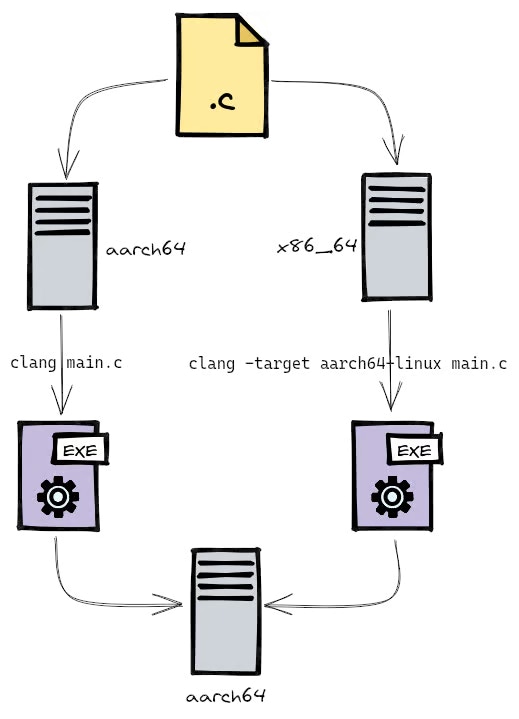
Software development processes can be done in two ways. The first is compiling directly on the board using the
compilation tools on the board, while the second method is called Cross Compilation, where you compile projects
on your own computer and then upload them to the board. Both methods and their advantages are explained below.
### 1.2. Operating System
Gemstone runs on a GNU/Linux operating system. It includes components such as the
[Kernel](https://github.com/t3gemstone/linux), [Bootloader (U-Boot)](https://github.com/t3gemstone/u-boot),
[Distribution (Distro)](https://github.com/t3gemstone/sdk/tree/main/distro), and Firmware. Tools like
[Yocto Project](https://kureansiklopedi.com/en/detay/yocto-project-the-yocto-project-eeba0) and
[Debootstrap](https://github.com/t3gemstone/debos) were used to assemble the system.
As GNU/Linux distributions ([Distro](https://github.com/t3gemstone/sdk/tree/main/distro)), Debian, Ubuntu,
and Poky are used. The use of Debian or Ubuntu is offered as selectable, as it may vary depending on the board's needs.
Various package management systems are used to perform software updates in GNU/Linux operating systems. For
example, in the [Quick Start](./quickstart#2-4-update-the-gemstone-operating-system) section, an Ubuntu
update example was given for system updates.
Similarly, the [https://packages.t3gemstone.org/apt](https://packages.t3gemstone.org/apt) package management system is used for all customized kernel,
driver, etc., software for T3 Gemstone boards. When you run the update command, the latest packages
— *if available* — are downloaded from the servers.
The operating system distribution used for Gemstone can also be used for BeagleBoard's BeagleY-AI. If you select
BeagleY-AI as the Board in the GemImager application, the created SD card can be used on the BeagleY-AI board.
Gemstone's operating system distribution is more powerful and up-to-date than what Beagleboard offers.
For faster boot times, various customizations in the Linux kernel and [Device Tree](/en/faq#what-is-device-tree) changes for driver selections of the
hardware included in the development boards are available in the
[github repository](https://github.com/t3gemstone/linux/tree/v6.1.83-ti-rt-arm64-r67-t3-gem-o1).
### 1.3. SDK (Software Development Kit)
The [T3 Gemstone SDK](https://github.com/t3gemstone/sdk) is used to compile and assemble all the components
mentioned above — *kernel, bootloader, distribution, etc.* — tools, packages, and software, and to create image files.
While the README file of the relevant repository briefly explains how to use it, more detailed explanations are
provided in the [SDK](./sdk/introduction) section of this Documentation. Tools such as
[Devbox](https://www.jetify.com/devbox), [Distrobox](https://github.com/89luca89/distrobox),
[Debos](https://github.com/t3gemstone/debos), and [Taskfile](https://taskfile.dev/) used in the SDK work are
areas that require extensive knowledge, so helpful resources are provided at the end of the documentation based
on your interests.
### 1.4. Github Repository
The purposes of the projects in the T3 Gemstone Github repository are listed in the table below.
| Project | Repo | Description |
| :------------- | :------------------------------------------------------------------------ | :----------------------------------------------------------------------------------------------------------------------------------------------------------------------------------------------- |
| SDK | [t3gemstone/sdk](https://github.com/t3gemstone/sdk) | Software development kit that compiles components like Kernel, U-Boot, Firmware, Driver, Initrd to create an operating system image. |
| Documentation | [t3gemstone/docs](https://github.com/t3gemstone/docs) | Mintlify source codes of this documentation you are reading. |
| Yocto | [t3gemstone/meta-gemstone](https://github.com/t3gemstone/meta-gemstone) | Codes of the Yocto project. |
| Linux Kernel | [t3gemstone/linux](https://github.com/t3gemstone/linux) | Linux codes used on the development boards. |
| Bootloader | [t3gemstone/u-boot](https://github.com/t3gemstone/u-boot) | Bootloader codes used on the development boards. Bootloader performs hardware health checks and starts the Linux kernel. |
| Debos | [t3gemstone/debos](https://github.com/t3gemstone/debos) | A cloned version of the Debos project with additional features for creating distributions. |
| GemImager | [t3gemstone/gem-imager](https://github.com/t3gemstone/gem-imager) | A customized version of the rpi-imager project with additional features for writing images to Gemstone boards. |
| Hardware | [t3gemstone/hardware](https://github.com/t3gemstone/hardware) | PCB designs of hardware components like motherboards for Gemstone boards. |
| Toolchains | [t3gemstone/toolchains](https://github.com/t3gemstone/toolchains) | Tools used for compiling C/C++ projects for different architectures. |
| Package Server | [t3gemstone/package-server](https://github.com/t3gemstone/package-server) | Linux APT package management server/system located at packages.t3gemstone.org. |
| noVNC | [t3gemstone/t3-gem-vnc](https://github.com/t3gemstone/t3-gem-vnc) | Software that allows remote desktop connection to Gemstone via a browser. |
| Ardupilot | [t3gemstone/ardupilot](https://github.com/t3gemstone/ardupilot) | autopilot software adapted for Gemstone, which can be used for every vehicle imaginable, from manned/unmanned air, land, and sea vehicles, to helicopters and aircraft, and even marine vessels. |
| NuttX | [t3gemstone/nuttx](https://github.com/t3gemstone/nuttx) | Real-time operating system running on hardware with MCUs like PX4. It will be made to work on the R5 MCU cores in Gemstone O1 boards in the future. |
# 2. Development
Software development processes can be done in two ways. The first is compiling directly on the board using the
compilation tools on the board, while the second method is called Cross Compilation, where you compile projects
on your own computer and then upload them to the board. Both methods and their advantages are explained below.
 ### 2.1. Software Development on the Board
Example projects in C/C++/Python on how to use the components such as sensors, communication data lines, cameras,
artificial intelligence, and network on the Gemstone O1 development board are available at
[https://github.com/t3gemstone/examples](https://github.com/t3gemstone/examples). Below, the process of downloading and compiling this project on
the board is explained, and each component is separately described in the Development boards section.
This section shows how to download the t3gemstone/examples project onto the board, compile it, and run the examples.
For more detailed information check out the README.md file of t3gemstone/examples project.
#### 2.1.1. Clone example projects with Git
```bash theme={"system"}
gemstone@t3-gem-o1:~$ git clone https://github.com/t3gemstone/examples.git
gemstone@t3-gem-o1:~$ cd examples
```
#### 2.1.2. Install libraries and additional tools needed for compilation
```bash theme={"system"}
gemstone@t3-gem-o1:examples$ sudo apt install -y build-essential libncurses-dev libgpiod-dev
gemstone@t3-gem-o1:examples$ ./setup.sh
gemstone@t3-gem-o1:examples$ devbox shell
gemstone@t3-gem-o1:examples$ task fetch
```
#### 2.1.3. Compile an example project
```bash theme={"system"}
gemstone@t3-gem-o1:examples$ CROSS_COMPILE=false PROJECT=magnetometer task build
```
#### 2.1.4. Run the compiled project
```bash theme={"system"}
gemstone@t3-gem-o1:examples$ sudo ./build/examples/magnetometer/c/magnetometer
gemstone@t3-gem-o1:examples$ sudo ./build/examples/magnetometer/cpp/magnetometer
gemstone@t3-gem-o1:examples$ sudo ./build/examples/magnetometer/python/magnetometer
```
### 2.2. Software Development on the Developer's Computer
While it is possible to compile projects on the board as described above, compiling on your Laptop or Desktop
GNU/Linux operating system has some advantages. For example, while the *T3-GEM-O1* board has 4GB of Memory, your
Laptop may have 16/32GB of Memory and a more advanced Processor. Therefore, Cross Compile Toolchains are used to
speed up compilation processes.
Development boards mostly have ARM architecture processors, laptops and desktops mostly have Intel x86-64
architecture processors. In this case, Cross Compilation tools provide the ability to compile for different
architectures.
#### 2.2.1. Establish Ethernet connection between Gemstone board and your computer
Connect one end of Ethernet cable to Gemstone board and the other end to your computer.
After that set static IP to your computer as shown below.
### 2.1. Software Development on the Board
Example projects in C/C++/Python on how to use the components such as sensors, communication data lines, cameras,
artificial intelligence, and network on the Gemstone O1 development board are available at
[https://github.com/t3gemstone/examples](https://github.com/t3gemstone/examples). Below, the process of downloading and compiling this project on
the board is explained, and each component is separately described in the Development boards section.
This section shows how to download the t3gemstone/examples project onto the board, compile it, and run the examples.
For more detailed information check out the README.md file of t3gemstone/examples project.
#### 2.1.1. Clone example projects with Git
```bash theme={"system"}
gemstone@t3-gem-o1:~$ git clone https://github.com/t3gemstone/examples.git
gemstone@t3-gem-o1:~$ cd examples
```
#### 2.1.2. Install libraries and additional tools needed for compilation
```bash theme={"system"}
gemstone@t3-gem-o1:examples$ sudo apt install -y build-essential libncurses-dev libgpiod-dev
gemstone@t3-gem-o1:examples$ ./setup.sh
gemstone@t3-gem-o1:examples$ devbox shell
gemstone@t3-gem-o1:examples$ task fetch
```
#### 2.1.3. Compile an example project
```bash theme={"system"}
gemstone@t3-gem-o1:examples$ CROSS_COMPILE=false PROJECT=magnetometer task build
```
#### 2.1.4. Run the compiled project
```bash theme={"system"}
gemstone@t3-gem-o1:examples$ sudo ./build/examples/magnetometer/c/magnetometer
gemstone@t3-gem-o1:examples$ sudo ./build/examples/magnetometer/cpp/magnetometer
gemstone@t3-gem-o1:examples$ sudo ./build/examples/magnetometer/python/magnetometer
```
### 2.2. Software Development on the Developer's Computer
While it is possible to compile projects on the board as described above, compiling on your Laptop or Desktop
GNU/Linux operating system has some advantages. For example, while the *T3-GEM-O1* board has 4GB of Memory, your
Laptop may have 16/32GB of Memory and a more advanced Processor. Therefore, Cross Compile Toolchains are used to
speed up compilation processes.
Development boards mostly have ARM architecture processors, laptops and desktops mostly have Intel x86-64
architecture processors. In this case, Cross Compilation tools provide the ability to compile for different
architectures.
#### 2.2.1. Establish Ethernet connection between Gemstone board and your computer
Connect one end of Ethernet cable to Gemstone board and the other end to your computer.
After that set static IP to your computer as shown below.
 After setting your computer's IP, get a shell from Gemstone board via [serial port](./quickstart#2-1-serial-port)
and run the commands below. A new connection for static IP will be created and its priority will be set higher
than DHCP via `nmcli` tool. That way static IP will be assigned automatically.
```bash theme={"system"}
gemstone@t3-gem-o1:~$ sudo nmcli connection add \
con-name "eth0-static" \
ifname eth0 type ethernet \
ip4 10.0.0.1/24 \
connection.autoconnect yes
gemstone@t3-gem-o1:~$ sudo nmcli connection modify "eth0-static" connection.autoconnect-priority 10
gemstone@t3-gem-o1:~$ sudo nmcli connection modify "eth0-dhcp" connection.autoconnect-priority 20
```
After static IP is assigned, run the command below to test the connection. If you get a reply Ethernet connection is
successful.
```bash theme={"system"}
gemstone@t3-gem-o1:~$ ping 10.0.0.1
```
#### 2.2.2. Clone example projects with Git
```bash theme={"system"}
ubuntu@host:~$ git clone https://github.com/t3gemstone/examples.git
ubuntu@host:~$ cd examples
```
#### 2.2.3. Install toolchain and additional tools needed for compilation
```bash theme={"system"}
ubuntu@host:examples$ ./setup.sh
ubuntu@host:examples$ devbox shell
ubuntu@host:examples$ task fetch
```
#### 2.2.4. Cross compile an example project using the toolchain
```bash theme={"system"}
ubuntu@host:examples$ PROJECT=magnetometer task build
```
#### 2.2.5. Upload compiled project into the development board
```bash theme={"system"}
ubuntu@host:examples$ scp -r build/examples gemstone@10.0.0.1:build
```
#### 2.2.6. Run the compiled project
```bash theme={"system"}
gemstone@t3-gem-o1:~$ sudo ./build/magnetometer/c/magnetometer
gemstone@t3-gem-o1:~$ sudo ./build/magnetometer/cpp/magnetometer
gemstone@t3-gem-o1:~$ sudo ./build/magnetometer/python/magnetometer
```
# 3. VSCode Remote Development
You can perform development by making a remote connection to Gemstone via VSCode installed on your operating system.
With this method, you perform code compilation processes on the board using your own computer's resources.
For your board to support this, the SSH option in the [Services](./quickstart#services) section explained in the
quickstart section must be checked during installation.
### 3.1. Installing the Extension
To establish a remote connection via VSCode, you need to install the "Remote - SSH" extension developed by Microsoft.
1. Open VSCode.
2. Click on the **Extensions** icon in the left menu or press `Ctrl+Shift+X`.
3. Type `Remote - SSH` in the search bar.
4. Find the extension published by Microsoft and click the **Install** button.
### 3.2. SSH Configuration (Recommended)
It is recommended to configure your SSH keys to connect quickly without entering a password every time.
#### 3.2.1. Creating an SSH Key
Create a key pair by running the following command in your computer's terminal (Linux/macOS terminal or Windows PowerShell):
```bash theme={"system"}
ssh-keygen -t rsa -b 4096
```
You can skip the questions following this command with the default settings (by pressing the Enter key).
#### 3.2.2. Copying the Key to the Board
Use the following command to transfer the public key you created to the Gemstone board:
```bash theme={"system"}
ssh-copy-id gemstone@192.168.7.2
```
If you have changed Gemstone's IP address or assigned a [static IP](#2-2-1-establish-ethernet-connection-between-gemstone-board-and-your-computer),
enter the relevant address.
### 3.3. Connecting to the Target Device
After installing the extension and completing the SSH settings, you can start the connection.
1. Click on the blue **Open a Remote Window** icon in the lower-left corner of VSCode.
2. Select **Connect to Host...** from the menu that opens.
3. Type `gemstone@192.168.7.2` and press `Enter`.
4. Once the connection is established, you will see the **SSH: 192.168.7.2** label in the lower-left corner.
### 3.4. Opening the Project Folder and Working
After the connection is successful, you can start working by selecting a folder on Gemstone via "File > Open Folder".
When developing, you may need to reinstall extensions such as **C/C++**, **Python**, or **CMake Tools** while
connected to the remote device. You can perform this process with the "Install on SSH: 192.168.7.2" button in the
Extensions tab.
After setting your computer's IP, get a shell from Gemstone board via [serial port](./quickstart#2-1-serial-port)
and run the commands below. A new connection for static IP will be created and its priority will be set higher
than DHCP via `nmcli` tool. That way static IP will be assigned automatically.
```bash theme={"system"}
gemstone@t3-gem-o1:~$ sudo nmcli connection add \
con-name "eth0-static" \
ifname eth0 type ethernet \
ip4 10.0.0.1/24 \
connection.autoconnect yes
gemstone@t3-gem-o1:~$ sudo nmcli connection modify "eth0-static" connection.autoconnect-priority 10
gemstone@t3-gem-o1:~$ sudo nmcli connection modify "eth0-dhcp" connection.autoconnect-priority 20
```
After static IP is assigned, run the command below to test the connection. If you get a reply Ethernet connection is
successful.
```bash theme={"system"}
gemstone@t3-gem-o1:~$ ping 10.0.0.1
```
#### 2.2.2. Clone example projects with Git
```bash theme={"system"}
ubuntu@host:~$ git clone https://github.com/t3gemstone/examples.git
ubuntu@host:~$ cd examples
```
#### 2.2.3. Install toolchain and additional tools needed for compilation
```bash theme={"system"}
ubuntu@host:examples$ ./setup.sh
ubuntu@host:examples$ devbox shell
ubuntu@host:examples$ task fetch
```
#### 2.2.4. Cross compile an example project using the toolchain
```bash theme={"system"}
ubuntu@host:examples$ PROJECT=magnetometer task build
```
#### 2.2.5. Upload compiled project into the development board
```bash theme={"system"}
ubuntu@host:examples$ scp -r build/examples gemstone@10.0.0.1:build
```
#### 2.2.6. Run the compiled project
```bash theme={"system"}
gemstone@t3-gem-o1:~$ sudo ./build/magnetometer/c/magnetometer
gemstone@t3-gem-o1:~$ sudo ./build/magnetometer/cpp/magnetometer
gemstone@t3-gem-o1:~$ sudo ./build/magnetometer/python/magnetometer
```
# 3. VSCode Remote Development
You can perform development by making a remote connection to Gemstone via VSCode installed on your operating system.
With this method, you perform code compilation processes on the board using your own computer's resources.
For your board to support this, the SSH option in the [Services](./quickstart#services) section explained in the
quickstart section must be checked during installation.
### 3.1. Installing the Extension
To establish a remote connection via VSCode, you need to install the "Remote - SSH" extension developed by Microsoft.
1. Open VSCode.
2. Click on the **Extensions** icon in the left menu or press `Ctrl+Shift+X`.
3. Type `Remote - SSH` in the search bar.
4. Find the extension published by Microsoft and click the **Install** button.
### 3.2. SSH Configuration (Recommended)
It is recommended to configure your SSH keys to connect quickly without entering a password every time.
#### 3.2.1. Creating an SSH Key
Create a key pair by running the following command in your computer's terminal (Linux/macOS terminal or Windows PowerShell):
```bash theme={"system"}
ssh-keygen -t rsa -b 4096
```
You can skip the questions following this command with the default settings (by pressing the Enter key).
#### 3.2.2. Copying the Key to the Board
Use the following command to transfer the public key you created to the Gemstone board:
```bash theme={"system"}
ssh-copy-id gemstone@192.168.7.2
```
If you have changed Gemstone's IP address or assigned a [static IP](#2-2-1-establish-ethernet-connection-between-gemstone-board-and-your-computer),
enter the relevant address.
### 3.3. Connecting to the Target Device
After installing the extension and completing the SSH settings, you can start the connection.
1. Click on the blue **Open a Remote Window** icon in the lower-left corner of VSCode.
2. Select **Connect to Host...** from the menu that opens.
3. Type `gemstone@192.168.7.2` and press `Enter`.
4. Once the connection is established, you will see the **SSH: 192.168.7.2** label in the lower-left corner.
### 3.4. Opening the Project Folder and Working
After the connection is successful, you can start working by selecting a folder on Gemstone via "File > Open Folder".
When developing, you may need to reinstall extensions such as **C/C++**, **Python**, or **CMake Tools** while
connected to the remote device. You can perform this process with the "Install on SSH: 192.168.7.2" button in the
Extensions tab.