> ## Documentation Index
> Fetch the complete documentation index at: https://docs.t3gemstone.org/llms.txt
> Use this file to discover all available pages before exploring further.
# U-Boot
> Bootloader
When the Yocto build is initiated, [U-Boot used in Gemstone boards](https://github.com/t3gemstone/u-boot) is
automatically downloaded, compiled, and its outputs are packaged. Therefore, no additional commands need to be run.
If there is a situation that requires recompiling U-Boot (e.g., adding support for booting the operating system
from an SSD), the following steps can be followed.
Some operations, such as modifying kernel parameters or adding device-tree overlays, can be done without
recompiling U-Boot by updating the `/boot/uEnv.txt` file.
All the commands below will be executed inside the distrobox. Therefore, you must first run the
`devbox shell` --> `task box` commands. Additionally, to switch to the Yocto environment, you need
to run the `m:oeinit t3-gem-o1` command.
### Updating Configuration with Menuconfig
If you want to enable/disable various features (such as enabling the TFTP command) instead of modifying
the source code, you can access menuconfig using the following commands.
In this example, the T3-GEM-O1 board will be used for explanation. If you are applying these steps for a
different machine, change the machine name accordingly.
```bash theme={"system"}
bitbake -c menuconfig virtual/bootloader
```
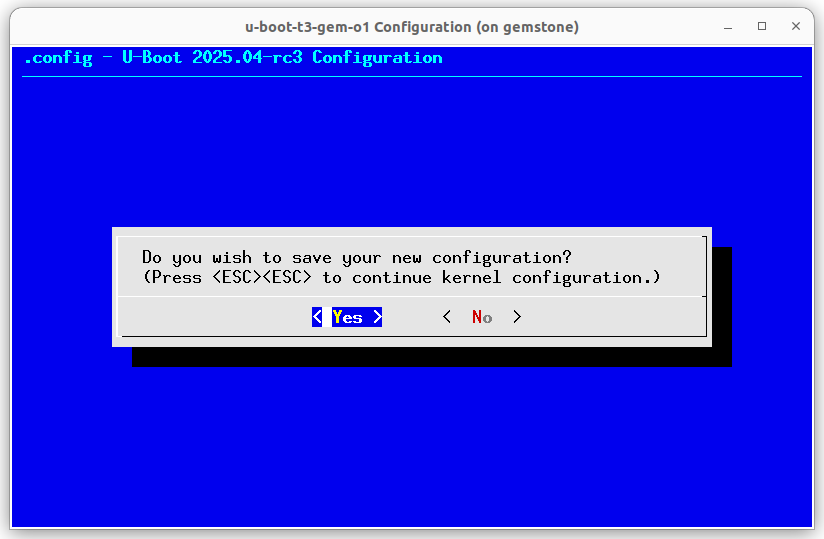
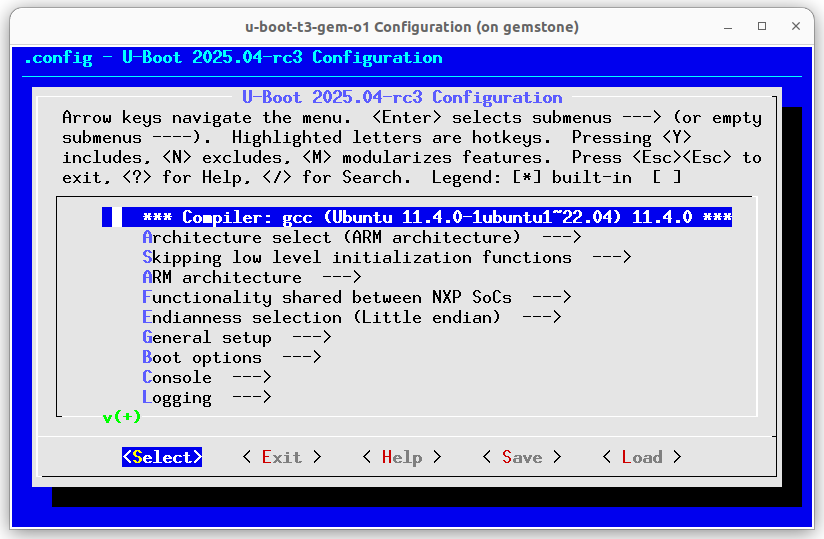 After making the desired changes, press the `ESC` key until the following window appears. Then,
select the "Yes" button.
After making the desired changes, press the `ESC` key until the following window appears. Then,
select the "Yes" button.
 At this stage, you can recompile U-Boot, but your changes will only remain on your local machine and will be
lost if you clean the build directory. To prevent this, follow the steps below.
```bash theme={"system"}
bitbake -c diffconfig virtual/bootloader
cp /home/workdir/build/tmp-musl/work/t3_gem_o1-gemstone-linux-musl/u-boot-t3-gem-o1/2025.04+git/fragment.cfg \
/home/workdir/yocto/meta-gemstone/dynamic-layers/meta-ti/recipes-bsp/u-boot-t3-gem-o1/files/fragment.config
```
Rename the `fragment.config` file in the `meta-gemstone/dynamic-layers/meta-ti/recipes-bsp/u-boot-t3-gem-o1/files`
directory to a name that describes your changes without altering the `.config` extension. Then, add this name to
the `SRC_URI` variable in the
`meta-gemstone/dynamic-layers/meta-ti/recipes-bsp/u-boot-t3-gem-o1/u-boot-t3-gem-o1_2025.04.bb` file. For example,
let's assume we renamed the file to `fragment-enable-tftp.config`.
```bash highlight=5 theme={"system"}
SRC_URI:append:t3-gem-o1 = " \
file://uEnv-desktop.txt \
file://uEnv-rd.txt \
file://fragment-mmc-env.config \
file://fragment-enable-tftp.config \
"
```
```bash theme={"system"}
bitbake -c clean virtual/bootloader
bitbake virtual/bootloader
```
If the above commands complete successfully, the `u-boot.img` and `u-boot-spl.bin` files will be
generated in the `/build/t3-gem-o1/deploy-ti/images` directory.
### Modifying Source Code
Open the `/build/tmp-musl/work/t3_gem_o1-gemstone-linux-musl/u-boot-t3-gem-o1/2025.04+git/git`
folder in your text editor. After making the desired changes, compile U-Boot using the following commands.
To avoid losing your changes, you can create your own fork of the
[T3 Gemstone U-Boot repository](https://github.com/t3gemstone/u-boot) and push your changes there.
```bash theme={"system"}
bitbake virtual/bootloader
```
After the compilation is complete, copy the generated files in the
`/build/t3-gem-o1/deploy-ti/images` directory to the `/boot` directory on the SD card. If you
have fixed an issue or added a new feature, you can create a pull request to the
[T3 Gemstone U-Boot repository](https://github.com/t3gemstone/u-boot) so the community can benefit from it.
At this stage, you can recompile U-Boot, but your changes will only remain on your local machine and will be
lost if you clean the build directory. To prevent this, follow the steps below.
```bash theme={"system"}
bitbake -c diffconfig virtual/bootloader
cp /home/workdir/build/tmp-musl/work/t3_gem_o1-gemstone-linux-musl/u-boot-t3-gem-o1/2025.04+git/fragment.cfg \
/home/workdir/yocto/meta-gemstone/dynamic-layers/meta-ti/recipes-bsp/u-boot-t3-gem-o1/files/fragment.config
```
Rename the `fragment.config` file in the `meta-gemstone/dynamic-layers/meta-ti/recipes-bsp/u-boot-t3-gem-o1/files`
directory to a name that describes your changes without altering the `.config` extension. Then, add this name to
the `SRC_URI` variable in the
`meta-gemstone/dynamic-layers/meta-ti/recipes-bsp/u-boot-t3-gem-o1/u-boot-t3-gem-o1_2025.04.bb` file. For example,
let's assume we renamed the file to `fragment-enable-tftp.config`.
```bash highlight=5 theme={"system"}
SRC_URI:append:t3-gem-o1 = " \
file://uEnv-desktop.txt \
file://uEnv-rd.txt \
file://fragment-mmc-env.config \
file://fragment-enable-tftp.config \
"
```
```bash theme={"system"}
bitbake -c clean virtual/bootloader
bitbake virtual/bootloader
```
If the above commands complete successfully, the `u-boot.img` and `u-boot-spl.bin` files will be
generated in the `/build/t3-gem-o1/deploy-ti/images` directory.
### Modifying Source Code
Open the `/build/tmp-musl/work/t3_gem_o1-gemstone-linux-musl/u-boot-t3-gem-o1/2025.04+git/git`
folder in your text editor. After making the desired changes, compile U-Boot using the following commands.
To avoid losing your changes, you can create your own fork of the
[T3 Gemstone U-Boot repository](https://github.com/t3gemstone/u-boot) and push your changes there.
```bash theme={"system"}
bitbake virtual/bootloader
```
After the compilation is complete, copy the generated files in the
`/build/t3-gem-o1/deploy-ti/images` directory to the `/boot` directory on the SD card. If you
have fixed an issue or added a new feature, you can create a pull request to the
[T3 Gemstone U-Boot repository](https://github.com/t3gemstone/u-boot) so the community can benefit from it.